
Nobody tells you what’s the real difference between Skool’s Hobby and Pro plans. The price page is only showing you half the story.
You’re looking at that clean, simple pricing comparison thinking “okay, $9 versus $99, I can obviously start with Hobby and upgrade later if I need to.”
And sure, that logic makes sense until you get into the backend and realize all the features they’re not advertising on the front page.
I’m talking about automation blockers, pixel tracking limitations, workflow restrictions, and commission structures that could literally cost you hundreds (or thousands) in the long run depending on your community goals.
So let me flip the switches that actually matter. No fluff, no reading the pricing page at you word-for-word. Just the real backend differences that will help you make an informed decision about which plan fits your stage right now.
And yeah, I built a free calculator that shows you exactly where your break-even point is based on your pricing and member count. We’ll get to that.
Let’s start with what Skool shows you upfront, because it’s intentionally simple:
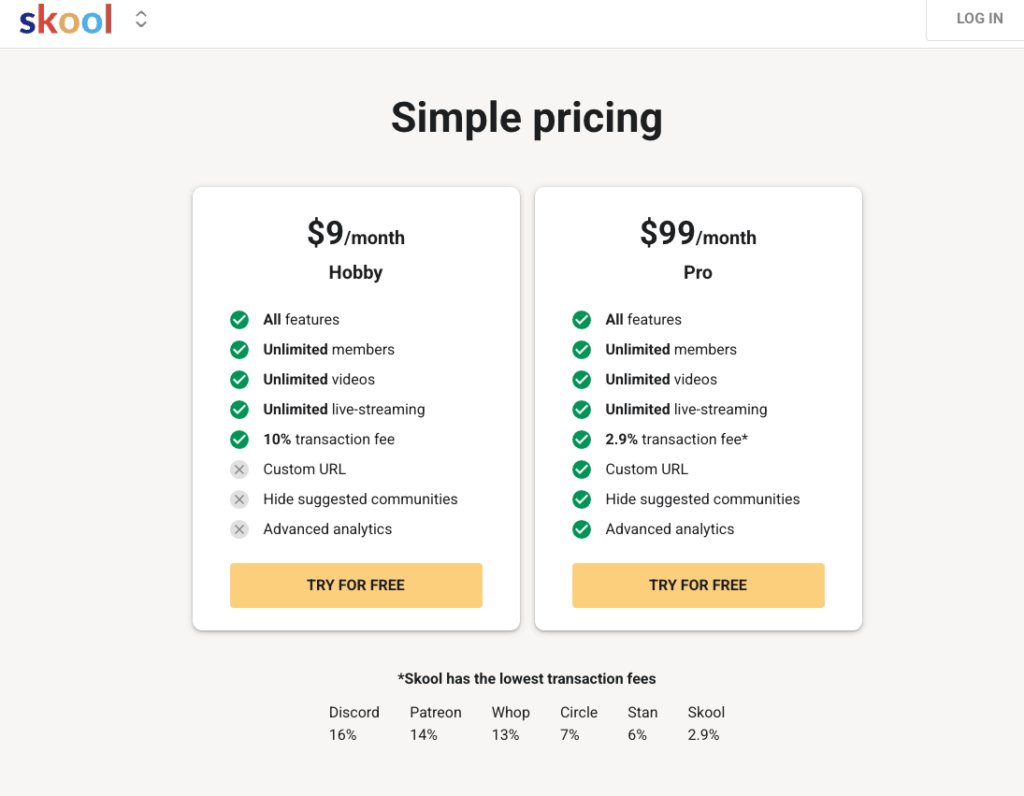
On the surface, it looks like the main differences are admin seats, transaction fees, and some branding control. And if you’re running a free community with no plans to monetize, honestly? Hobby might work just fine.
But if you’re building a paid community, selling products in your classroom, running ads, or planning to scale, there’s a whole other layer of backend features that changes everything.

Alright, let’s get into what you actually need to know before you commit to either plan.
If you’re on the Hobby plan, there’s a “Powered by Skool” banner on your community’s about page. It’s customer-facing, meaning everyone who visits your community sees Skool’s branding sitting there.
On Pro? No banner. Your branding only.
Now, does this matter? Depends. If you’re building a professional paid community and want complete brand control, that banner might bug you. If you’re running a casual free group, you probably don’t care.
Just know it’s there, and there’s no way to remove it on Hobby.
This is huge if you’re thinking long-term or building a business with any kind of estate planning in mind.
Hobby gives you one admin seat—you. That’s it.
Pro gives you unlimited admins and moderators. You can bring on team members, give top community members moderator status as a perk, or (and this is important) add someone as a backup admin with billing access in case something happens to you.
I have my daughter set up as an admin with billing access on my Pro account. If something happens to me, she has the authority and permissions to step in and manage the community. You can’t do that on Hobby.
If you’re a solopreneur running a one-person show, that might not matter right now. But if you’re building something meant to outlast you or grow beyond you, that admin limitation is non-negotiable.
On the Pro plan, you get a custom URL like skool.com/your-community-name. Clean, professional, easy to share.
On Hobby, you get something like skool.com/your-community-name-5473829. It works, but it’s not pretty.
The workaround? You can use a URL shortener or redirect service. If you have WordPress, use Pretty Links to create a custom redirect.
If you don’t, try Rebrandly (they have a free plan). You’ll need your own domain, but you can set up a redirect like yoursite.com/community that points to your long Skool URL.
One thing to note: even on Pro, you only get one free custom URL change. After that, it costs $100 each time you want to change your community name. So choose wisely.
The good news? Skool automatically redirects your old URL to the new one if you do change it, so you won’t lose traffic.
If you’re on the Hobby plan, there’s a “Suggested Communities” section that shows up where the leaderboard normally sits on Pro accounts. It’s sticky, meaning it scrolls down the page with users.
And here’s the kicker: you can’t control what communities show up there. It’s randomized. Other people’s groups will appear, and they refresh every time someone reloads the page.
Skool has said they’re working on making suggested communities more relevant to your niche as more people join Hobby, but right now? It’s a wild card.
On Pro, you can hide suggested communities entirely and show the leaderboard instead, which keeps people focused on engagement within your community.
If you’re running a paid community and don’t want members distracted by other people’s groups, that’s a pretty big deal.
This was a game-changer for me when I realized the difference.
On Pro, you can set up an affiliate program for your community members. When someone shares your community link and their friend joins and buys something, that member earns a commission. I have mine set to 40%.
It’s a genius way to incentivize your most engaged members to spread the word and get rewarded for bringing in buyers.
On Hobby? No affiliate program for your members. You’d have to track referrals and pay people manually, which… good luck with that.
Now let’s talk about your commissions as a Skool affiliate.
When you’re on Pro and someone creates a new Skool community while they’re logged into your community, Skool auto-credits that referral to you. You get the affiliate commission without them needing to click your specific link.
On Hobby, there’s no auto-credit. You only get credit if someone clicks your unique affiliate link. And here’s the problem: if one of your members is also in another community and creates their account from that community, the other person gets the commission—not you.
If you’re planning to promote Skool and earn those sweet $50+ monthly recurring commissions per referral, the auto-credit feature on Pro is kind of a big deal.
Okay, this is where things get real. Skool has a bunch of backend plugins that automate and streamline your community management. Hobby only gets three of them.
Here’s what Hobby gets:
That’s it. Everything else? Pro only.
Here’s what you’re missing on Hobby:
Auto-DM new members – On Pro, you can set up an automated welcome message that goes out to every new member the second they join. It works 24/7, even while you’re sleeping. On Hobby, you have to DM people manually. Every. Single. Time.
Custom onboarding video – Pro lets you upload a custom video that walks new members through your community, tells them what to do first, and sets expectations. Hobby gets Skool’s generic onboarding video or nothing.
Zapier integrations – This is massive if you run any kind of automation. With Pro, you can connect Skool to tools like GoHighLevel, ActiveCampaign, or other CRMs to automatically unlock modules, segment members, or trigger workflows based on their activity. None of that works on Hobby.
Webhook integrations – Similar to Zapier but more customizable for advanced automations. If you’re running a sophisticated business with segmented offers, you need this. Hobby doesn’t have it.
Facebook Pixel tracking – If you’re running Facebook or Instagram ads to grow your community, you need the Meta Pixel to track who visits your community page, retarget them, and build custom audiences. Without it, you’re flying blind and wasting ad spend. Hobby doesn’t let you add a pixel.
Cancellation video – When someone tries to leave your paid community, Pro lets you show them a custom video offering a discount, asking for feedback, or convincing them to stay. It’s a simple churn-reduction tool that can save you hundreds in lost revenue. Not available on Hobby.
Google Ads tracking – If you’re running Google Ads, same deal as the Facebook Pixel. You need tracking. Hobby doesn’t offer it.
Custom links on your About page – On Pro, you can add links to your YouTube channel, other communities, your website, etc. on your About page. On Hobby, you can’t.
Instant member approval – This one matters for paid communities. When someone pays to join, they want instant access. On Pro, you can turn on automatic approval so they’re in immediately. On Hobby, you have to manually approve every single person—even paying customers. That’s a terrible user experience.
If you’re building a paid community or planning to automate any part of your workflow, these missing plugins on Hobby are going to slow you down and cost you time (and probably money).
This is where the math gets interesting.
Both plans charge a $0.30 transaction fee per purchase. But the percentage they take is wildly different:
That’s a 7.1% difference in what you keep per transaction.
On Hobby, you keep roughly 90% of every sale (after fees). On Pro, you keep 97.1%.
Doesn’t sound like much, right? But let’s say you’re charging $27/month for your community and you have 200 members. That 7.1% difference adds up fast.
And this is exactly why I built the Hobby vs Pro Calculator (which you’ll get free access to in the Builder Community—link below). It shows you exactly where your break-even point is based on your pricing and member goals.
Here’s an example using the calculator:
If you’re charging $9/month and want to take home $5,000/month:
At what point does Pro become more profitable than Hobby? At $9/month pricing, once you hit 141 members, Pro starts saving you money overall despite the higher monthly cost.
If you’re charging $27/month:
The higher your pricing, the faster Pro pays for itself. And that doesn’t even account for all the automation and workflow efficiencies you get with Pro that save you time—which is also money.
If you want to run the numbers for your specific situation, grab the free calculator in the Builder Community. You can plug in your pricing, your revenue goals, and see exactly how many members you need and where your break-even point sits.
Look, I’m not here to trash the Hobby plan. It has its place.
Hobby makes sense if:
But here’s where Hobby falls apart:
If you’re building a paid community, the 10% transaction fee eats into your profit fast. If you’re planning to run ads, you can’t track your traffic without the pixel. If you want automation to save time, you’re stuck doing everything by hand. And if you’re thinking about scale, those missing admin seats and workflow integrations will become bottlenecks real quick.
For me personally? I need automation. I run Facebook ads, so I need pixel tracking. I want my members to feel welcomed instantly with an auto-DM. I need backup admin access for estate planning. And I’m not about to waste ad spend on traffic I can’t retarget.
Even with Skool’s budget-friendly “five for five” or “five for seven” ad strategies (if you don’t know what that is, come join the Builder Community), I’m not wasting visits without proper tracking.
Plus, Skool is rolling out subscription tiers soon, which will let you run free, low-ticket, and high-ticket offers all in one community. When that drops, I want everything centralized in one place with full automation and segmentation. I can’t do that on Hobby.
So yeah, I’m firmly Team Pro. But that’s because of how I’m running my business and where I’m headed.
Here’s something most people don’t know yet: Skool is about to launch subscription courses with tiered pricing inside a single community.
Right now, if you want to offer different membership levels, you either need separate communities or you’re stuck with one-time purchases in the classroom. But soon, you’ll be able to have free members, $27/month members, and $197/month members all in the same community with different access levels.
This is huge for creating synergy. When your free members see the success stories, exclusive events, and value your paying members are getting—all in one place—it naturally creates that “I need to upgrade” energy.
From what I understand, both Hobby and Pro will have access to subscription tiers. But I’m guessing (and this is pure speculation) that Hobby will still lack the automation to manage those tiers efficiently. Which means you might be stuck doing manual unlocks and segmentation for each tier level.
I don’t know about you, but I’m not trying to manually manage three different membership tiers. That’s a recipe for burnout.
If you’re just starting and you genuinely don’t need automation, ads, or advanced features—start with Hobby. Get in the game for $9 and see if your community idea has legs.
But if you’re serious about building a paid community, scaling with ads, automating your workflows, or creating a real business around your community? Go Pro from day one.
The $90/month difference isn’t just buying you a custom URL and lower transaction fees. It’s buying you time, automation, tracking, and scalability. And in a one-person business, those things are priceless.
Want to see the exact numbers for your situation? Join the free Builder Community (link below) and grab the Hobby vs Pro Calculator. Plug in your pricing, your goals, and see exactly where your break-even point is.
You’ll also get access to the free Builder Notion Dashboard, my custom AI customer avatar tool, and a whole community of people building digital product empires just like you.
Your community starts now. Which plan are you choosing?

Digital Product AI Creator & Mentor